
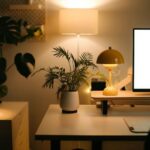





Creating a home workspace that feels both relaxing and productive is essential for anyone working remotely or spending extended hours at a desk. When your workspace is comfortable and organized, it can improve focus, reduce stress, and make working from home an enjoyable experience. This guide offers practical tips to help you design a calming environment that supports your productivity and well-being.
Choose the Right Location
The first step in creating a relaxing home workspace is selecting the best spot in your home. Ideally, pick a quiet area where you can focus without frequent interruptions.
– Natural Light: Work near a window if possible. Natural light improves mood and reduces eye strain.
– Privacy: Choose a location away from high-traffic zones in your home to minimize distractions.
– Space: Make sure there is enough room for your desk, chair, and any other equipment you need.
Invest in Comfortable Furniture
Comfortable and ergonomic furniture can make a big difference in how productive and relaxed you feel.
– Ergonomic Chair: Select a chair that supports your posture with adjustable height, lumbar support, and comfortable cushioning.
– Desk Height: Your desk should allow your arms to rest comfortably at a 90-degree angle while typing.
– Additional Seating: Consider a small lounge chair or ottoman nearby for breaks or reading sessions.
Organize and Declutter
A tidy workspace helps clear your mind and makes it easier to concentrate.
– Storage Solutions: Use shelves, drawers, and organizers to keep supplies and paperwork out of sight.
– Cable Management: Use clips or cord organizers to prevent tangled wires, which can be distracting.
– Daily Clean-Up: Spend a few minutes at the end of each day tidying your desk to maintain a clean environment.
Incorporate Soothing Colors and Decor
The colors and decor you choose can greatly influence your mood and productivity.
– Calming Colors: Soft blues, greens, and neutral tones are known to reduce stress and increase focus.
– Personal Touch: Add photos, artwork, or objects that inspire and motivate you.
– Plants: Indoor plants improve air quality and bring a touch of nature indoors, which can boost creativity and serenity.
Control Lighting
Proper lighting reduces eye strain and creates a comfortable workspace atmosphere.
– Task Lighting: Use a desk lamp with adjustable brightness to focus light where you need it.
– Ambient Lighting: Avoid harsh overhead lights; opt for softer, warm light sources.
– Screen Position: Position your computer screen to avoid glare from windows or lights.
Minimize Noise Distractions
Noise can greatly impact your ability to concentrate.
– Soundproofing: Use rugs, curtains, or acoustic panels to dampen sound.
– Background Sounds: Some people find white noise or soft music helpful. Experiment to see what works best for you.
– Noise-Canceling Headphones: These can be a great investment if you are in a noisy environment.
Maintain Good Air Quality
Fresh air contributes to comfort and alertness.
– Ventilation: Open windows regularly to let in fresh air.
– Air Purifiers: Consider an air purifier if your workspace tends to feel stuffy.
– Plants: As mentioned earlier, plants can also assist in keeping air fresh and clean.
Establish Boundaries and Routine
Having clear work boundaries and a routine helps maintain a healthy work-life balance.
– Set Specific Work Hours: Stick to a schedule to keep your workday structured.
– Breaks: Take regular breaks to stretch, hydrate, and rest your eyes.
– Signal Work Time: Use visual cues like closing a door or a “do not disturb” sign to signal when you are working.
Personalize for Comfort
Adding elements that make you feel comfortable can reduce stress.
– Comfort Items: A cozy blanket, a cushion, or a footrest can make your space more inviting.
– Temperature Control: Use a fan, heater, or adjust room temperature to your preference.
– Aroma: Consider essential oil diffusers or scented candles with calming scents like lavender or eucalyptus.
Use Technology Wisely
Technology can both help and hinder productivity, so use it intentionally.
– Organizational Tools: Apps for task management, calendars, and note-taking keep you on track.
– Limit Distractions: Turn off non-essential notifications during work time.
– Reliable Equipment: Ensure your computer and internet connection are dependable to avoid frustration.
—
By thoughtfully designing your home workspace with these tips, you can create a relaxing environment that fosters both comfort and productivity. Remember, the best workspace is one that fits your personal needs and preferences — don’t hesitate to experiment until you find what works best for you. Happy working!